
What Is a Riser Desk? The Complete Guide
A riser desk sits on your existing desk and lifts to standing height. Here's how much height it adds, what it costs, and how it compares to a full standing desk.
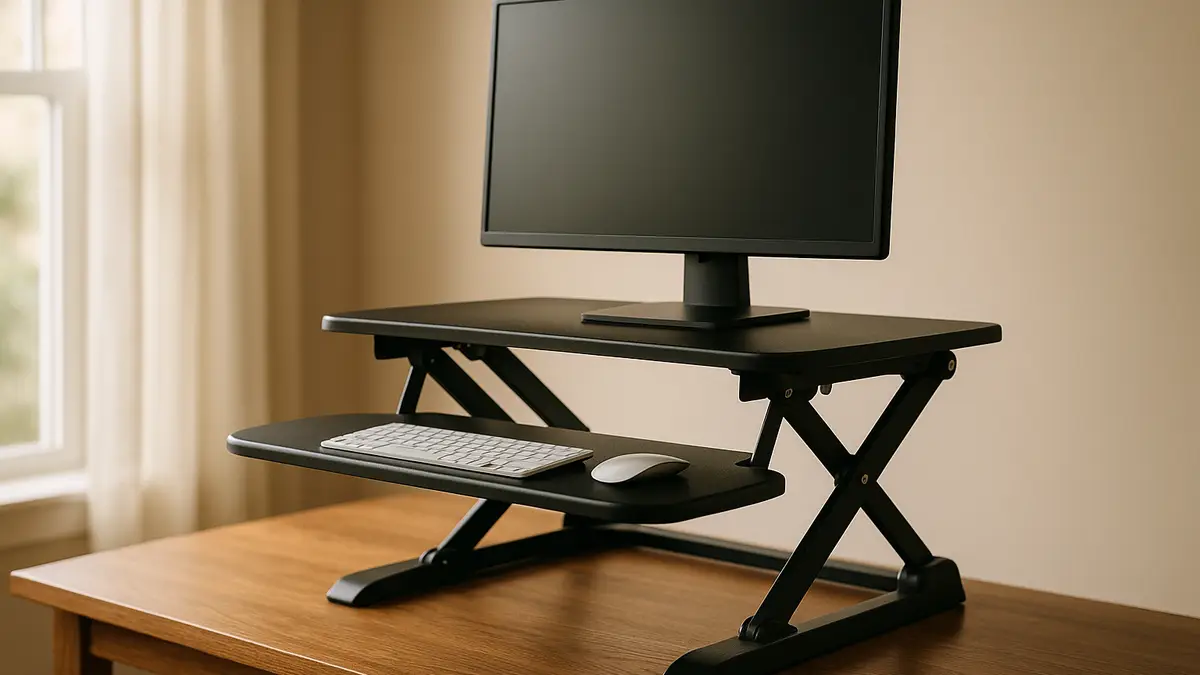
A riser desk is the fastest, cheapest way to start standing at work without buying a new desk. It sits on top of the desk you already own, and in under a minute you push, crank, or press a button and your keyboard and monitor are at standing height.
What is a riser desk?
A riser desk is a two-tier platform that sits on an existing desk and lifts your monitor, keyboard, and mouse between sitting and standing height, without replacing the desk underneath it. The lower tier usually holds the keyboard and mouse, and the upper tier holds the monitor, so both move together when you raise or lower the unit.
Riser desks go by several names: standing desk converter, desktop converter, or just “riser.” They all describe the same category of product, and all of them work on the same principle as a full standing desk (changing your work height on demand) with a much smaller footprint and price tag.
How much height does a riser desk add?
A riser desk typically adds 15.5 to 20 inches of lift above whatever surface it sits on. On a standard 29-inch fixed desk, that puts your working surface somewhere around 44.5 to 49 inches at full extension, which covers standing height for most adult users.
That range matters because it decides who a riser desk works for. Someone over 6’2” on a low desk may hit the top of the converter’s range before reaching a comfortable elbow angle, while someone shorter has room to spare. Our desk height calculator works out your exact target height in seconds so you’re not guessing.
Riser desk vs a full standing desk: what’s the real difference?
The core trade-off is footprint and cost against surface size and stability. A riser sits on top of a desk you keep; a full standing desk replaces the desk entirely.
| Riser desk | Full standing desk | |
|---|---|---|
| Setup | Sits on existing desk, no assembly of desk itself | Full desk assembly, legs and top |
| Height range added | 15.5 to 20 in above the surface | 22.5 to 48 in travel (25.3 to 50.9 in premium) |
| Typical price | $80 to $500 | $150 to $1,300+ |
| Usable surface at standing | Smaller, two tiers | Full desktop, one flat surface |
| Best for | Renters, small budgets, testing standing work | Permanent home offices, daily heavy use |
Neither option is objectively better. A riser desk wins on price and portability; a full standing desk wins on surface space and long-term durability. Our riser desk vs standing desk guide goes deeper into which one fits specific situations.
How much does a riser desk cost?
Riser desk pricing splits into three clear tiers:
- Budget ($80-$150): manual crank or pneumatic spring-assist lift, usually a single-tier or fixed dual-tier platform.
- Mid ($150-$300): electric lift with a dual-tier layout and a separate keyboard shelf.
- Premium ($300-$500): large electric converter with memory height presets and a monitor mount included.
Compare that to a full standing desk, which starts around $150 for a basic single-motor frame and climbs past $1,300 for a quad-motor premium build with a 350+ lb capacity. The gap explains why a riser desk is the default first purchase for anyone unsure whether standing desk work suits them.
Who should buy a riser desk?
A riser desk makes the most sense for renters who cannot swap out furniture, apartment dwellers with one shared desk, and anyone testing whether they actually like working standing before spending real money on a full desk. It is also the practical choice in a shared office where the desk itself is fixed but you still want the option to stand.
It is a weaker fit if you already know you want to stand most of the day, since the smaller working surface and lower stability ceiling of a converter get old fast under daily heavy use. In that case, skip straight to a full desk, and our standing desk converter picks can still help if you decide the converter route is worth it for now.
Manual, pneumatic, or electric: which lift mechanism?
Riser desks use one of three lift mechanisms, and the mechanism matters as much as the price tier when you’re deciding what to buy.
A manual crank mechanism uses a hand-turned gear to raise and lower the platform. It’s the slowest method, often 15 to 30 seconds for a full range change, but it’s also the cheapest and has the fewest parts to fail, which is why it dominates the budget tier.
A pneumatic spring-assist mechanism uses a gas spring, similar to an office chair’s, to help lift the platform with a lever pull. It’s faster than a crank, usually a couple of seconds, but the height often locks at only a few preset points rather than anywhere in the range, and the spring can weaken over years of use.
An electric mechanism uses a motor and a button, matching how a full standing desk operates, and it’s the only option that supports true memory height presets. It’s also the reason mid and premium converters cost more than budget ones, since the motor and control board add real manufacturing cost.
If you switch positions often through the day, electric is worth the premium. If you set a standing height once and rarely change it, a manual or pneumatic converter saves money without costing you much in daily convenience.
How do you pick the right height?
Height is the one spec that decides whether a riser desk actually feels good to use. Measure your standing elbow height, or better, run your numbers through the desk height calculator, which factors in your height, footwear, and whether you sit, stand, or switch between the two.
If you would rather build a fixed-height solution than buy a converter, our DIY standing desk guide walks through building a simple standing setup from scratch for close to converter money.
A riser desk is the low-commitment entry point into standing work: cheap, fast to set up, and honest about its limits. Once you know you want to stand daily, the math shifts toward a full desk, and that comparison is worth reading before you spend twice.
Frequently asked questions
Quick answers to what readers ask us most
Is a riser desk the same thing as a standing desk?
No. A riser desk sits on top of an existing desk and only the top tier moves, while a standing desk is a full desk whose entire surface and legs raise and lower. See our riser desk vs standing desk comparison for the full breakdown.
How much does a good riser desk cost?
Budget manual models start around $80 to $150, mid-tier electric converters run $150 to $300, and large premium converters with memory presets and a monitor mount run $300 to $500.
Will a riser desk fit any desk?
Most fit desks at least 24 inches deep, but check the converter's footprint against your desk before buying, especially with a dual-monitor setup. A desk under 29 inches tall (the standard fixed-desk height) usually gives the most usable standing range.
Do riser desks wobble at full height?
Cheap single-tier models can, especially with a heavy monitor. Dual-tier converters with a steel frame and a stated weight rating are noticeably steadier; check our best standing desk converters list for models that held steady in testing.