
How to Set Up an Ergonomic Home Office Desk
A step-by-step ergonomic desk setup: correct desk and monitor height, keyboard and mouse position, chair adjustment, and a clean cable layout that actually stays clean.
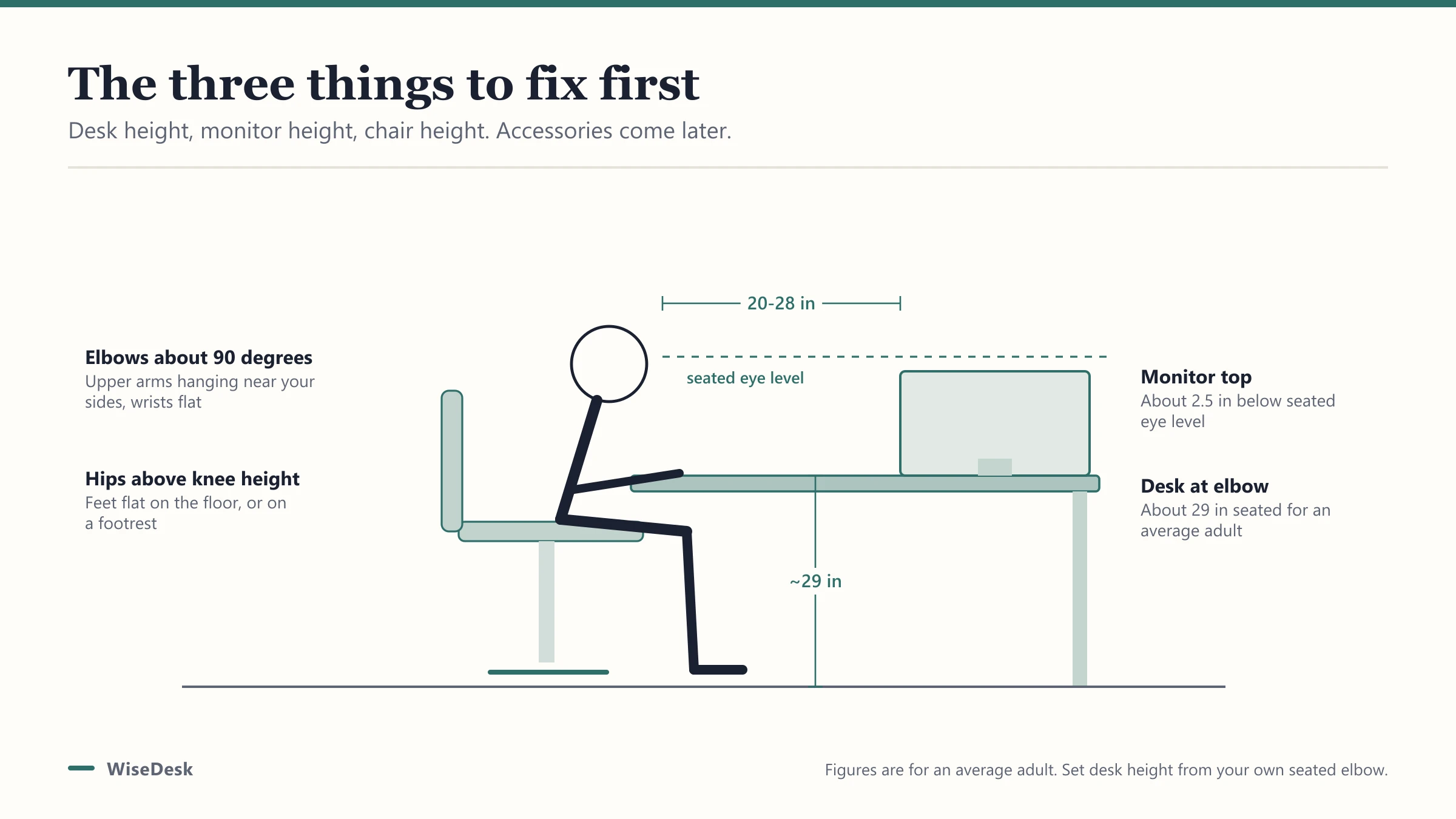
Most desk discomfort traces back to three numbers: desk height, monitor height, and chair height. Get those right first, and a clean, ergonomic setup mostly falls into place; skip them and no amount of gel wrist rests will fix the underlying problem.
What does an ergonomic desk setup actually require?
An ergonomic desk setup is a work surface where your desk height, monitor position, and seating keep your joints near neutral angles: elbows near 90 to 110 degrees, wrists straight rather than bent up or down, and eyes level with the top third of your monitor. Everything else, from cable routing to desk organizers, is about keeping that arrangement clean and repeatable, not about comfort on its own.
What desk height should you use?
For seated work, target roughly 29 inches from floor to desktop, the long-standing furniture-industry default for a fixed desk. That number works for an average-height adult; taller or shorter than average, it’s worth running your exact measurement through our desk height calculator, which also accounts for footwear and whether you plan to add standing time.
If your current desk is fixed and wrong for your height, a riser desk or a set of adjustable legs solves the mismatch without buying an entirely new desk.
Where should your monitor sit?
Monitor height is the most commonly skipped step, and it’s the one most responsible for neck strain. The top of your screen should sit close to eye level, angled slightly down, with the whole monitor 20 to 28 inches away from your eyes (roughly an arm’s length), tilted back 10 to 20 degrees.
A monitor sitting on a stack of books or too low on the desk forces your neck into a forward tilt for hours a day. Our monitor height guide walks through getting that number exact, including when a monitor arm is worth the money over a fixed riser.
How should your chair be set?
Set seat height so your feet sit flat on the floor (or a footrest) with your knees at roughly hip height or slightly below. Armrests, if adjustable, should support your forearms without shrugging your shoulders up. Lumbar support should sit in the small of your back, not floating above it.
If you split time between sitting and standing, a chair alone won’t cover both modes; pairing a sit-stand desk with the right seating (including kneeling chairs and tall stools for standing-height perching) is covered in our chairs for standing desks guide.
Keyboard and mouse placement
Keep both at the same height, close enough that your elbows stay near your sides rather than reaching forward. Wrists should stay straight, not bent up toward the ceiling or down toward the desk edge; if your desk height forces a wrist bend, that’s a sign the desk itself, not the keyboard, needs adjusting.
| Setup element | Target | Common mistake |
|---|---|---|
| Desk height (seated) | ~29 in, adjust for your height | Fixed desk too tall or short for the user |
| Monitor top | Near eye level, 20-28 in away | Monitor too low, propped on books |
| Chair seat height | Feet flat, knees at hip height | Seat too high, feet dangling |
| Keyboard/mouse height | Same plane, elbows near sides | Reaching forward or bending wrists up |
What does a clean cable layout look like?
A clean desk setup routes every cable through one point rather than letting each cord find its own path to the wall. A single under-desk cable tray or basket catches power strips and cords in one bundle, out of sight and off the floor. Velcro cable sleeves group desk-to-monitor and desk-to-PC runs so they move together when you adjust height, which matters more than usual if your desk raises and lowers.
Label cords at the plug end, not the device end, since that’s where confusion happens when you’re under the desk troubleshooting later.
What about lighting and screen glare?
Lighting is part of an ergonomic setup even though it’s easy to overlook. Position your monitor perpendicular to windows rather than facing them or with your back to them; facing a window washes out your screen with glare, and sitting with a window behind you creates the same glare in reverse, reflected straight into your eyes.
A desk lamp aimed at your keyboard and papers, rather than at the monitor, reduces eye strain from constantly readjusting focus between a bright screen and a dim work surface. Warm, indirect light generally causes less eye fatigue over a full workday than a single harsh overhead source.
If you work near a window, a monitor with a matte rather than glossy finish handles ambient light better, and adjusting your monitor’s brightness to roughly match the room around it (not the blinding default factory setting) reduces the eye strain that often gets blamed on screen time rather than screen brightness.
Common ergonomic setup mistakes
- Fixing chair height without fixing desk height first. A great chair at the wrong desk height still leaves your wrists bent.
- Buying a monitor arm before checking if the desk itself is the wrong height. Address the bigger number first.
- Treating standing as a fix-all. A standing desk at the wrong height causes the same strain patterns as sitting wrong; see our 7 real benefits of a standing desk for what standing actually changes.
- Running every cable to the same power strip corner, creating a tangle that undoes any cable management the moment you unplug one thing.
Once height, monitor position, and chair are dialed in, the setup stays comfortable with almost no ongoing maintenance, which is the real measure of whether an ergonomic desk setup worked.
Frequently asked questions
Quick answers to what readers ask us most
What is the correct order to set up an ergonomic desk?
Desk height first, monitor height second, chair third, then cable management and accessories last. Fixing height problems solves most discomfort on its own; accessories are a smaller layer on top.
What desk height is ergonomic for typing?
Around 29 inches for an average-height adult seated, which is also the standard fixed-desk height furniture makers default to. Taller or shorter than average, run your exact number through our desk height calculator.
Does a standing desk make a setup more ergonomic automatically?
No. Standing at the wrong height causes the same strain as sitting at the wrong height. A standing desk only helps if you also get the standing height and monitor position right; see our riser desk guide if you're considering one.
How do I keep desk cables from looking messy again a week later?
Route everything through one cable tray or basket mounted under the desk, and bundle desk-to-wall cords with a single sleeve rather than individual zip ties. Loose cables re-tangle because they have nowhere to sit; a tray gives them a permanent home.