
Monitor Height Guide: Perfect Eye-Level Setup
Get monitor height right with the eye-level rule: top of screen 2.5 in below eye height, viewing distance 20-28 in, and when a riser or arm actually helps.
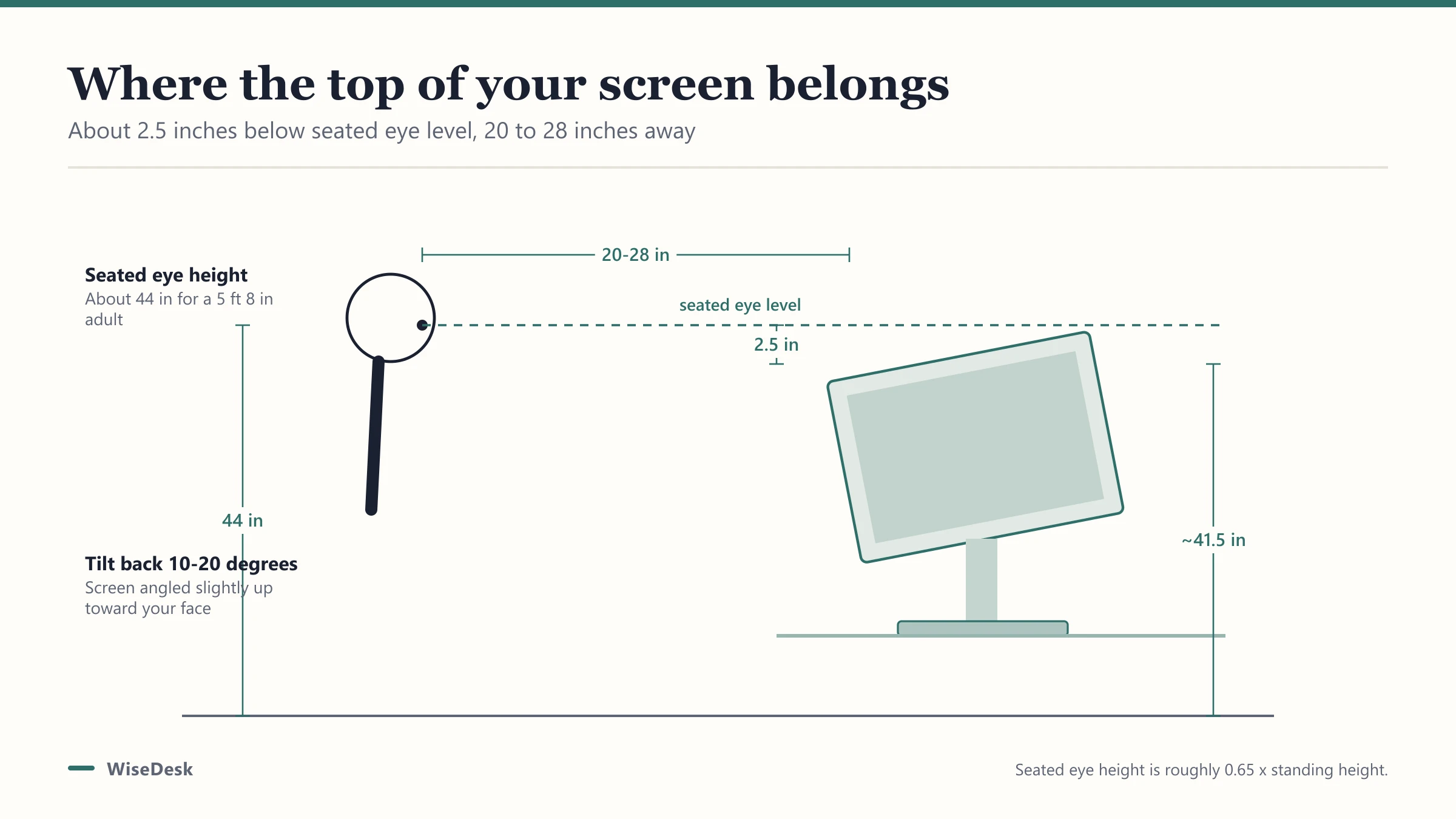
Monitor height causes more neck strain than almost any other desk setup mistake, and it’s also the cheapest to fix. Most people don’t need a new desk, just a few inches of lift under the screen and a quick check of viewing distance.
What is the correct monitor height?
The top of your monitor should sit roughly 2.5 inches below your seated eye height, not exactly level with your eyes. That small offset means your gaze angles slightly downward toward the middle of the screen, which is the resting position your eye muscles hold most comfortably over hours of use.
Seated eye height itself runs about 0.65 times your standing height, so a 5’8” adult (68 inches) has a seated eye height around 44 inches from the floor, putting the monitor’s top edge around 41.5 inches from the floor once you subtract the offset. Your desk height and monitor stand height need to add up to that number together.
How far away should your monitor sit?
Viewing distance is fixed regardless of your height: 20 to 28 inches from your eyes to the screen, roughly an arm’s length, with the panel tilted back 10 to 20 degrees. Sitting closer than that strains focus over a workday; sitting further pushes you to lean forward, undoing any height adjustment you just made.
Do you need a riser, a stand, or an arm?
This depends on how far off your current setup is and whether your desk changes height.
| Situation | Fix | Why |
|---|---|---|
| Monitor sits a few inches too low, fixed desk | Monitor stand or riser block | Cheapest fix, no moving parts to fail |
| Monitor sits far too low, fixed desk | Taller monitor stand or a stack riser | Larger fixed adjustment needed |
| Desk is a sit-stand model | Monitor arm | Screen height needs to travel with the desk automatically |
| Multiple monitors at different depths | Dual monitor arm | Keeps both screens level and independently adjustable |
Our desk height calculator works out the exact riser height you need based on your measurements and monitor size, so you’re not stacking books and guessing.
Why does this matter more on a standing desk?
Because the math has to work twice: once at your sitting height and once at your standing height, and a monitor that’s correct at one is often wrong at the other. A fixed monitor stand solves this for a desk that never moves, but on a riser desk or full sit-stand desk, a monitor arm is usually the better answer because it lets the screen height travel with the desk instead of staying fixed relative to the desktop.
What about laptop screens?
Laptops fail the eye-level rule by design, since the screen and keyboard are fixed to the same hinge and can’t be positioned independently. If you use a laptop as your main screen for more than an hour or two a day, raising it on a stand to fix screen height then forces you to add an external keyboard and mouse, since the built-in keyboard would now sit too high to type on comfortably.
This is one of the more common ergonomic mistakes: propping a laptop up on books for screen height while still typing on its built-in keyboard, which fixes the neck angle at the cost of bending both wrists upward. If a laptop is your primary machine, budget for an external keyboard and mouse alongside whatever riser or stand you use, not just the stand alone.
How do you check your current setup without buying anything?
Sit at your desk in your normal posture, look straight ahead without tilting your head up or down, and note where your eyes land on the screen naturally. If that spot is near the top third of the display, your height is close to correct. If your eyes land on the lower half of the screen or below it entirely, you’re likely looking down at a monitor that sits too low, which is the more common problem than a monitor sitting too high.
This quick check costs nothing and tells you whether a riser, stand, or arm is actually needed before you spend money guessing.
What if your monitor sits fine already?
Not every setup needs a riser. If the top of your screen already lands within an inch or two of the eye-level target at your normal seated posture, adding a riser can actually push it too high, forcing your neck to tilt back instead of down. Check before buying anything: sit normally, look straight ahead, and note where your gaze naturally lands on the screen.
Monitor size and viewing height
Larger monitors add visible screen height, which shifts where the center of the display sits relative to your eyes. A 24-inch monitor has roughly 11 to 11.8 inches of visible screen height; a 32-inch or larger panel runs closer to 15.7 inches. A taller screen at the same base height pushes its center lower relative to your eyes, so bigger monitors often need slightly more base height to keep the visual center in the right place, not less.
Fixing the rest of the setup
Monitor height is one piece of a larger setup. Once the screen is dialed in, check that your desk height and chair are matched to it too; our ergonomic desk setup guide walks through desk height, chair position, and keyboard placement as a full system rather than isolated fixes.
If you’re specifically weighing a monitor arm for a sit-stand desk, our best monitor arms for standing desks list covers weight ratings and reach for single and dual-monitor setups.
Frequently asked questions
Quick answers to what readers ask us most
Should the top of my monitor be exactly at eye level?
Close, but slightly below. The standard guidance puts the top of the screen about 2.5 inches below seated eye level, so your gaze angles gently down toward the middle of the screen rather than sitting perfectly level with the very top edge.
How far should my monitor be from my face?
20 to 28 inches, roughly an arm's length, with the screen tilted back 10 to 20 degrees. Move closer for small text work, but stay within that range to avoid eye strain from focusing too near.
Do I need a monitor riser or is my desk fine as is?
Sit at your desk normally and check where the top of your screen lands relative to your eyes. If it sits noticeably below eye level even with good posture, you need a riser or arm; use our desk height calculator for the exact inches to add.
Is a monitor arm better than a fixed riser?
For a sit-stand desk, yes, since an arm's height travels with the desk while a fixed riser stays put. For a desk that never changes height, a fixed riser or stand does the same job for less money. See our monitor arm picks for sit-stand setups.